This blog will discuss new component added to Power Apps. It is about the "Settings" component. Indeed, this component allows adding a configuration layer for a model-driven application. This allows to easily activate or deactivate a feature for a model-driven app. For more information on this component, I invite you to read this excellent blog … Continue reading Transform your Model-driven app to a multi-session app using settings solution component
Model-driven app
How to pass an object from a model app driven app to a custom page?
According to the current documentation, we can pass a dataverse record as a parameter. This is still very beneficial for some scenarios. But what if we want to pass a set of parameters without using an existing record. After several attempts, I managed to pass an object containing some properties from the model driven app … Continue reading How to pass an object from a model app driven app to a custom page?
How to display a Power Apps | Canvas app in full screen without the title bar?
Recently, I was asked to open a PowerApps | Canvas app without the title bar at the top of the screen. After some research, I found an answer from matthew devaney that proposed to add the "&hidenavbar=true" parameters to the URL of the application. This works perfectly and allows us to hide the title bar. … Continue reading How to display a Power Apps | Canvas app in full screen without the title bar?
Pass data from Custom page dialog to the parent model driven app
The new Custom Page component can be opened as a dialog in a model driven app. This feature will allow app makers to quickly create intuitive dialogs without code with a rendering that is close to the standard model driven app's dialogs, since it uses Fluent UI controls that are also used by Model Driven … Continue reading Pass data from Custom page dialog to the parent model driven app
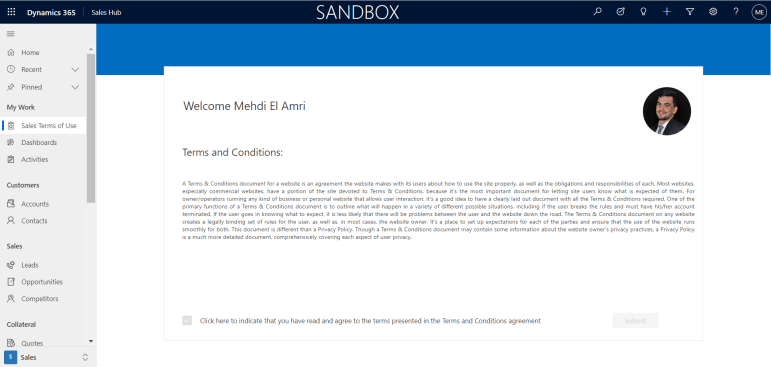
Let’s add terms and conditions to a Model Driven App using Custom Page
This blog will discuss a new component for Power Apps Model Driven Apps called Custom Page. In fact, this component joins the family of existing pages like Forms, Views and Dashboards. This new type of page is based on the Canvas Apps container and will surely add power, flexibility and a lot of possibilities to … Continue reading Let’s add terms and conditions to a Model Driven App using Custom Page

First look at the multi-tab panel (sidePanes)
In this blog, we will discuss a new feature that will be available in the Powerplatform Wave 2 2021 release, it is about the side panel that appears on the right side of an MDA, you can find the announcement of this new feature on the following documentation: Model driven apps support multiple app side … Continue reading First look at the multi-tab panel (sidePanes)
Apply a business logic to the Opportunity Close Quick Create form according to the context of the opportunity closure
In the release 2 2019, Microsoft introduced the ability to modify the Opportunity Close dialog using the Quick Create Form. In this blog, we will discuss the ability to apply a business logic to the Opportunity Close Quick Create form according to the context of the opportunity closure. Use Case Change the "Close Date" label … Continue reading Apply a business logic to the Opportunity Close Quick Create form according to the context of the opportunity closure
Cancel the save based on the result of an asynchronous operation
In 2017, Natraj Yegnaraman shared a clever method to cancel the save of a form. His approach was to cancel the save before the asynchronous operation and then retrigger the save if needed after the asynchronous operation is resolved. You can find all the details on the following link. This approach is explained by the … Continue reading Cancel the save based on the result of an asynchronous operation
A glance of the “OnLoad” event on a Model Driven App form (Async OnLoad event)
This blog will discuss a potential upcoming feature that is related to the "OnLoad" event of the forms for a model driven app. The goal is to look at the process of turning this event from synchronous to asynchronous using the "app settings" component. Also, some benefits of implementing an asynchronous logic on the "OnLoad" … Continue reading A glance of the “OnLoad” event on a Model Driven App form (Async OnLoad event)
How to run JavaScript code when loading a model driven app?
Have you ever needed to execute a JavaScript code when opening a model driven app? Maybe to initialize some global variables, display a notification or open a dialog (...) This blog will discuss a way to meet this need using a method that is not yet documented and therefore not yet supported by Microsoft. The … Continue reading How to run JavaScript code when loading a model driven app?
 XRM Tricks (Power Platform & Dynamics CRM )